









10 Signs Your Cloud Infrastructure Is About to Get Hacked
By Roland Ndah | NdaKum Consulting Services Most businesses do not get hacked suddenly. The attack builds slowly — sometimes over weeks or months — before anything obvious happens. The problem is that most teams are not watching for the early warning signs. In this post, I will walk you through the 10 most common red flags that your cloud infrastructure is being targeted or has already been compromised. If you see any of these in your environment, act immediately. 1. Unusual Spikes in Cloud Spending One of the earliest signs of a cloud breach is an unexpected jump in your AWS, Azure, or GCP bill. Attackers who gain access to your cloud environment often spin up high-powered compute instances to mine cryptocurrency or launch attacks on other targets — all on your bill. If your monthly cloud spend suddenly jumps 30%, 50%, or more with no corresponding business activity, investigate before you pay that bill. Enable billing alerts in your cloud provider dashboard so you get notified the moment spending crosses a threshold. 2. Unrecognized IAM Users or Service Accounts Identity and Access Management (IAM) is the front door to your cloud environment. If attackers get in, one of the first things they do is create new users or service accounts so they can maintain access even if you change your passwords. Run a monthly audit of all IAM users, roles, and service accounts. Any account you do not recognize — especially ones with admin privileges — is a serious red flag. Enable AWS CloudTrail or Azure Activity Logs to track who is creating accounts and when. 3. Login Attempts From Unusual Locations If your team is based in North Carolina and you suddenly see login attempts from Romania, Nigeria, or China at 3am, that is not a coincidence. Geographic anomalies in login patterns are one of the clearest early warning signs of a brute force or credential stuffing attack. Enable multi-factor authentication (MFA) on every account — no exceptions. Use your cloud provider’s threat detection tools (AWS GuardDuty, Azure Defender) to automatically flag logins from suspicious locations. 4. API Calls You Did Not Make Your cloud environment runs on API calls. Every action — launching an instance, modifying a security group, accessing an S3 bucket — is an API call that gets logged. If your logs show API calls happening at odd hours, from unfamiliar IP addresses, or for actions your team never performs, someone else has access to your environment. Review your CloudTrail or equivalent logs regularly. Look specifically for calls like CreateUser, DeleteBucket, ModifySecurityGroup, or GetSecretValue that you cannot account for. 5. Security Groups or Firewall Rules That Were Modified Attackers who get inside your cloud environment often modify security groups to open ports — giving themselves a permanent backdoor into your systems. A security group that suddenly allows inbound traffic from 0.0.0.0/0 (the entire internet) on port 22 (SSH) or port 3389 (RDP) is a major warning sign. Set up alerts for any changes to security groups or network ACLs. No one should be able to open firewall rules without triggering a notification to your security team. 6. Unexpected Data Transfers or Egress Traffic Data exfiltration — stealing your data and moving it outside your environment — is a key goal of most attackers. Large and unexpected outbound data transfers, especially to unfamiliar IP addresses or regions, indicate that someone may be copying your data out of your cloud environment. Monitor your VPC flow logs and network traffic regularly. Set alerts for unusual egress volumes. If 50GB of data suddenly leaves your environment in the middle of the night, you need to know immediately. 7. Disabled or Deleted Logging and Monitoring This one is critical. Sophisticated attackers know that logs are the evidence trail that will expose them. One of the first things they do after gaining access is disable or delete your logging — CloudTrail logs, GuardDuty alerts, Azure Monitor — to cover their tracks. If you notice your logging has been turned off and you did not do it, treat that as a confirmed breach, not just a warning sign. Enable log integrity validation and make sure only a small number of trusted administrators can modify logging settings. 8. New or Modified Lambda Functions and Automation Scripts Serverless functions like AWS Lambda or Azure Functions are a favourite hiding spot for attackers. They can inject malicious code into existing functions or create new ones that quietly run in the background — exfiltrating data, sending spam, or maintaining persistence in your environment. Audit your Lambda functions and automation scripts regularly. Any function you did not create, or any existing function whose code has changed without a corresponding deployment, deserves immediate investigation. 9. Exposed Secrets or API Keys in Code Repositories This is one of the most common entry points for cloud breaches. A developer accidentally commits an AWS access key or database password to a public GitHub repository. Automated bots scan GitHub constantly — and within minutes of that commit, attackers have your credentials and are already in your environment. Use tools like AWS Secrets Manager or HashiCorp Vault to manage secrets. Enable secret scanning in GitHub. If you ever accidentally expose a key, rotate it immediately — do not just delete the commit, because the key has already been seen. 10. Your Threat Detection Tools Are Generating Alerts You Are Ignoring This is the most uncomfortable one. AWS GuardDuty, Azure Defender, and Google Security Command Center generate real-time alerts about suspicious activity. But in many organizations, those alerts pile up unread because no one has set up a proper response process. If your threat detection tools are screaming and no one is listening, you are not protected — you just think you are. Set up an alert triage process. Route critical findings to Slack, PagerDuty, or email so the right person sees them immediately. What to Do If You See Any of These Signs Prevention Is Always Cheaper Than Recovery The average cost of a cloud data
Multi-Cloud vs Hybrid Cloud: Which Is Right for Your Business in 2026?
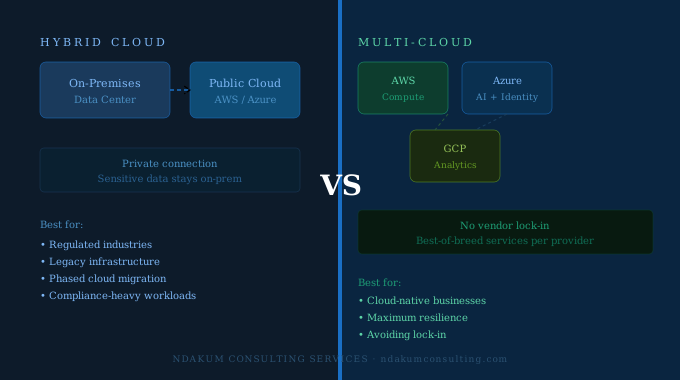
By Roland Ndah | NdaKum Consulting Services · May 2026 · 8 min read Multi-Cloud vs Hybrid Cloud: Which Is Right for Your Business in 2026? If you have ever sat in a boardroom and heard someone say “we need to go multi-cloud” — only for someone else to say “no, we need a hybrid approach” — you are not alone. These two terms get thrown around constantly, and they are often confused with each other. In this post, I will break down exactly what each one means, how they differ, and most importantly, which one makes sense for your business in 2026. First, Let’s Define the Terms What Is Hybrid Cloud? A hybrid cloud strategy connects your on-premises infrastructure (your own servers and data center) with one or more public cloud environments — such as AWS, Azure, or Google Cloud. The two environments work together, sharing data and applications, with a secure connection between them. Think of it like having a private office (your data center) that is connected to a shared coworking space (the public cloud). You keep your most sensitive work in the private office, but you use the shared space when you need to scale up or access specialized tools. What Is Multi-Cloud? A multi-cloud strategy means using two or more public cloud providers simultaneously. For example, you might run your workloads on AWS, use Azure for your Microsoft 365 integrations and AI services, and rely on Google Cloud for analytics and BigQuery. There is no private data center in the picture — it is purely about distributing your work across multiple cloud vendors. ⚡ Key distinction: Hybrid cloud is about connecting private and public infrastructure. Multi-cloud is about using multiple public cloud providers. A company can also do both at the same time — that is called a hybrid multi-cloud strategy. Why Does This Decision Matter in 2026? The stakes have never been higher. Cloud spending is expected to hit $1.3 trillion globally in 2026, and businesses that pick the wrong architecture end up paying for it — literally. Vendor lock-in, compliance failures, unexpected egress costs, and security gaps are all common outcomes of a poorly planned cloud strategy. On the other hand, a well-executed cloud architecture can reduce infrastructure costs by up to 30–40%, improve uptime, and give your teams the agility to ship faster. Hybrid Cloud: Pros and Cons ✅ Advantages ❌ Disadvantages Multi-Cloud: Pros and Cons ✅ Advantages ❌ Disadvantages Side-by-Side Comparison Factor Hybrid Cloud Multi-Cloud Best for Legacy systems + regulated data Cloud-native, modern businesses Infrastructure On-prem + public cloud Multiple public clouds only Vendor lock-in risk Medium (tied to one public cloud) Low (spread across providers) Compliance suitability High (data stays on-prem) Medium (depends on config) Operational complexity Medium-High High Upfront cost Higher (hardware investment) Lower (pay-as-you-go) Migration speed Gradual Faster (all cloud) Resiliency Medium High Which One Is Right for Your Business? Choose Hybrid Cloud if… Choose Multi-Cloud if… 💡 Pro tip: Many mature enterprises end up with a hybrid multi-cloud approach — keeping some workloads on-prem for compliance while distributing cloud workloads across AWS and Azure. It is more complex, but it offers the most flexibility. This is where having a cloud strategy partner makes all the difference. Real-World Example Consider a regional healthcare company with 500 employees. They store patient records (EHR data) on-premises to meet HIPAA requirements, but they use AWS for their patient-facing web application and Azure for their internal Microsoft 365 and Teams environment. That is a hybrid multi-cloud setup — and it is very common. On the other hand, a fast-growing SaaS startup with no legacy infrastructure would likely go pure multi-cloud from day one — AWS for their primary workloads and Google Cloud for their data warehouse and ML pipelines. What About Cost? Cost is always a major factor. Here is a rough framework: In both cases, cloud cost optimization (rightsizing instances, using reserved capacity, eliminating idle resources) is essential. Many businesses overpay by 30–40% simply due to poor cloud governance. Key Questions to Ask Before You Decide Final Thoughts There is no universal right answer between multi-cloud and hybrid cloud. The best strategy depends entirely on your business — your regulatory environment, your existing infrastructure, your team’s skills, and your long-term goals. What I can tell you from working with businesses across multiple industries is this: the companies that struggle are the ones that make the decision without a clear strategy. They either rush to the cloud without thinking about compliance, or they stay on-premises too long and fall behind on speed and innovation. The companies that thrive are the ones that map their architecture to their business objectives — and revisit that architecture as the business evolves. Not sure which cloud strategy is right for you? At NdaKum Consulting Services, we help businesses design and implement cloud architectures that match their goals — whether that is hybrid cloud migration, multi-cloud strategy, or cloud security hardening.Let’s Talk →